Bin Sponsorship: Explained for Card Issuers
BIN sponsorship is the arrangement in which a card programme uses a Bank Identification Number (BIN) that belongs to a licensed issuing institution, so the sponsor's BIN, currency and region rules apply to every transaction your card makes. On BigCoinPay you do not apply for sponsorship separately: you complete KYC, then choose a BIN from a card group inside the issuing platform, and the BIN card shows the open fee, minimum top-up and currency before you confirm. The practical work is matching the BIN's region and currency to the merchant, because a mismatch is one of the listed mechanical reasons a payment is declined. This article breaks sponsorship into five checkable dimensions, gives a comparison table of the four published BINs, corrects three common misconceptions, and states when BigCoinPay is not a fit.
Where issuers get stuck, and the one-sentence answer
The sticking point is usually sequencing. Issuers look for a separate sponsorship contract, a sponsor bank contact or an application form, and stall there. In this platform the sponsorship decision is made inside the card-opening flow: the BIN you pick is the sponsorship you get, and its region, currency and fee line are displayed on the BIN card before you confirm.
BIN sponsorship, for card issuers, means issuing your cards under a BIN whose region, currency and network rules are already defined, so your job is to select the BIN that matches your merchants rather than to negotiate a new one. BigCoinPay issues virtual Visa and Mastercard cards under published BINs; there is no physical card.
- Log in and open left menu "Card management", then click top-right "New card".:The card group list appears; pick a card group to see its BINs.(1-2 minutes)
- Pick a BIN, filtering by use case first.:The BIN card shows open fee, minimum top-up and currency for that BIN.(1-3 minutes)
- Sponsorship choice = BIN choice, made at card opening, not in a separate contract step.
- Every BIN card shows three numbers before you commit: open fee, minimum top-up, currency.
- KYC must be approved before any card exists; review usually completes in minutes, at most one business day.
Dimension 1: region and currency of the sponsored BIN
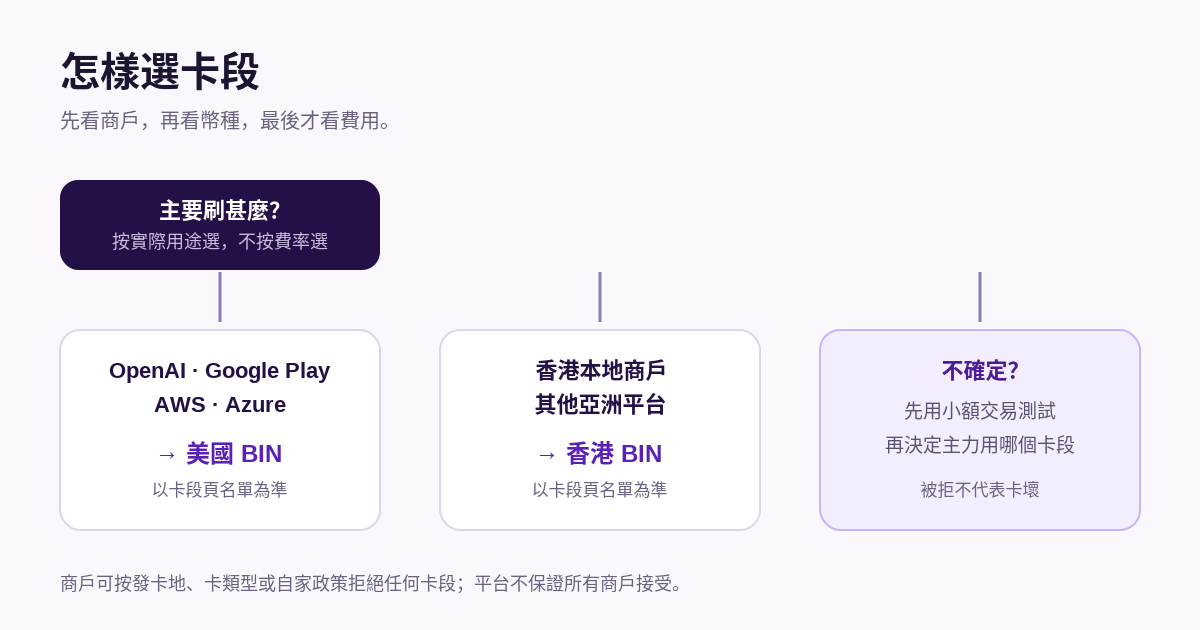
The published card group "熱門推薦" contains four BINs, all settling in USD: BIN 436797 (VISA, HK), BIN 448213 (VISA, US), BIN 49372410 (VISA, SG) and BIN 49372495 (VISA, SG). Region is not cosmetic. One listed mechanical reason for a decline is that the merchant or account region mismatches the BIN, and the fix is to use a matching BIN.
Currency works the same way. All four BINs are USD cards, so a merchant that bills in another currency is a mismatch question you should test before scaling, not after. Because the platform does not publish per-merchant acceptance guarantees, treat each new merchant as subject to testing.
- In "Card management", open the BIN detail for each candidate BIN.:The region label (HK, US or SG) and currency (USD) appear on the BIN card.(2-3 minutes)
- After issuing, open left menu "Transaction history" and filter by card.:Declined entries appear alongside successful ones, so you can see whether the pattern is regional.(2-5 minutes)
- HK, US and SG are the three regions available in the published card group.
- All four published BINs are USD; there is no non-USD BIN in the facts provided.
- Region mismatch is a listed decline reason with a defined fix: switch to a matching BIN.
Dimension 2: the fee line you are sponsoring under
Each published BIN carries an open fee of 5.0000 USD, a top-up rate of 5.0000%, and no transaction fee on normal spending. Two further amounts are fixed across BINs: the minimum preload when opening a card is 10.0000 USD and the minimum retained card balance is 10.0000 USD, both deducted from account balance.
Two per-transaction charges sit outside the BIN line. A verification-transaction fee of 0.2 USD per transaction is deducted from account balance. A declined-transaction fee of 0.2000 USD applies per transaction only for BINs that charge transaction fees. The approved example is: top up 50 USD to a card, open fee 5 USD. For any other amount, the result depends on your actual amount.
- Open /tools/fees-calculator in a browser; no login is required.:The calculator page loads and you can enter an amount to see the fee breakdown.(1-2 minutes)
- In "New card", enter quantity, minimum top-up and card note, then confirm.:A confirmation screen restates the open fee and minimum top-up before the card is created.(2-4 minutes)
- Open fee: 5.0000 USD per card on all four published BINs.
- Top-up rate: 5.0000% on all four published BINs.
- Minimum preload at opening: 10.0000 USD; minimum retained balance: 10.0000 USD.
- Verification-transaction fee: 0.2 USD per transaction, from account balance.
Dimension 3: matching a BIN to a merchant before you commit
The platform exposes a merchant-level check that most issuers skip. Left menu "Merchant card picker" takes a merchant name or domain and shows which BIN has transaction records at that merchant. When the sample is too small, the system shows "insufficient data" rather than a number — read that as no evidence, not as a negative result.
Only four merchants are confirmed to work: OpenAI, Google Play, AWS and Azure. Any other merchant is not tested or subject to testing. No success rate is published for any BIN or merchant, so the picker output and your own transaction history are the only evidence available.
- Open left menu "Merchant card picker" and enter the merchant name or domain.:A list of BINs with transaction records at that merchant, or the text "insufficient data".(1-3 minutes)
- Open left menu "Card management", click "New card", pick the card group, then the BIN the picker returned.:The BIN card shows open fee, minimum top-up and currency for that BIN.(2-3 minutes)
- Confirmed working merchants: OpenAI, Google Play, AWS, Azure.
- Every other merchant: not tested or subject to testing.
- "Insufficient data" is a distinct system state, not a zero.
Dimension 4: controls that make a sponsored BIN auditable
Sponsorship is only defensible if you can show what happened on each card. BigCoinPay provides card-level charging, so limits and balances are set per card rather than pooled. Card number and CVV are encrypted at rest and hidden by default; you must tap reveal in the card detail to see them, and every reveal is logged. Two-step verification applies to the account, and sensitive operations are fully audited.
Freeze and close are per card in the card management page, and a closed card cannot be edited. KYC documents are readable only by reviewers. For programme-level integration, the merchant open API uses HMAC-SHA256 signing plus webhooks.
- In "Card management", open a card detail and tap reveal.:Card number and CVV display, and the reveal is recorded in the audit trail.(Under 1 minute)
- Open left menu "Developer" to reach the API credentials and webhook settings.:The developer page with signing and webhook configuration.(2-5 minutes)
- Card number and CVV: hidden by default, reveal is logged each time.
- Freeze and close: per card; a closed card cannot be edited.
- KYC documents: readable only by reviewers.
- API: HMAC-SHA256 signing plus webhooks.
Dimension 5: funding the sponsored card
Account recharge minimum is 50.0000 USD and maximum is 10000.0000 USD. USDT on-chain top-up has a minimum of 50.0000 USD. A single USDT top-up over 500 USD goes to manual review rather than instant credit, and total top-ups over 1000.0000 USD within 24 hours also go to manual review. Plan issuance around those two thresholds.
The USDT funding flow is fixed: transfer to the address shown, submit the transaction hash on the top-up page, the platform verifies on-chain, the amount is credited to account balance, and you then top up the card from that balance. Referral sign-up bonus is 5.0000 USD.
- Open left menu "Finance" and start a USDT top-up.:The deposit address is displayed for you to transfer to.(1-2 minutes)
- Submit the transaction hash on the top-up page.:The platform verifies on-chain and credits account balance.(Varies with on-chain confirmation)
- Return to "Card management" and top up the card from account balance.:The card balance updates and the card is ready to spend.(1-3 minutes)
- Recharge range: 50.0000 USD minimum, 10000.0000 USD maximum.
- Single USDT top-up over 500 USD: manual review.
- Total top-ups over 1000.0000 USD in 24 hours: manual review.
Comparison table: the four published BINs
Use this table to shortlist a BIN before opening a card. All four sit in card group "熱門推薦" and settle in USD; the only published difference between them is region.
- Shortlist by region first, then confirm with the merchant card picker.
- Two SG BINs are listed; check both in the picker before choosing.
- Minimum preload 10.0000 USD and minimum retained balance 10.0000 USD apply on top of the open fee.
| BIN | Network | Region | Currency | Open fee | Top-up rate | Transaction fee on normal spending |
|---|---|---|---|---|---|---|
| 436797 | VISA | HK | USD | 5.0000 USD | 5.0000% | None |
| 448213 | VISA | US | USD | 5.0000 USD | 5.0000% | None |
| 49372410 | VISA | SG | USD | 5.0000 USD | 5.0000% | None |
| 49372495 | VISA | SG | USD | 5.0000 USD | 5.0000% | None |
Three misconceptions about BIN sponsorship
Misconception one: sponsorship is a separate contract you sign before you can issue. Reality: on this platform you complete KYC, then pick a BIN inside "New card"; the BIN card shows the open fee, minimum top-up and currency, and that selection is the sponsorship you operate under.
Misconception two: a confirmed merchant means every BIN works there. Reality: only OpenAI, Google Play, AWS and Azure are confirmed to work, and no success rate is published for any BIN. A decline can come from region mismatch, an unsupported BIN for overseas spending, a merchant not on the allow list, or issuer risk control; each has its own fix.
Misconception three: a declined payment costs nothing. Reality: a declined-transaction fee of 0.2000 USD per transaction applies for BINs that charge transaction fees, deducted from account balance, and a verification-transaction fee of 0.2 USD per transaction applies as well.
- Decline fixes, per the platform: top up for insufficient balance; raise the per-transaction limit for over-limit; activate first; check expiry and CVV; switch to a BIN that supports overseas spending; use another merchant if not on the allow list; match the BIN to the merchant or account region; switch network or retry later for issuer risk control.
When BigCoinPay is not a fit, and what to consider first
BigCoinPay is not a fit if you need a physical card: the platform issues virtual Visa and Mastercard only. If your programme depends on handing a plastic card to a cardholder, stop here and evaluate physical-card issuance elsewhere before doing any integration work.
It is also not a fit if your merchants cannot be served by an HK, US or SG BIN settling in USD. The published card group contains only those regions and only USD, and region mismatch is a listed decline reason. If your merchant mix sits outside that set, test with the merchant card picker first; if the picker returns "insufficient data", you have no evidence to plan on.
Finally, it is not a fit if you cannot complete KYC. Applicants must complete KYC, identity documents from any country or region are accepted, and review usually completes in minutes, at most one business day. There is no path around this step. Before committing, also check that your funding pattern fits the published thresholds: a single USDT top-up over 500 USD or total top-ups over 1000.0000 USD within 24 hours both go to manual review, so a programme that needs instant credit above those lines should plan for the delay or reconsider.
- Need a physical card: not supported here.
- Merchants outside HK, US or SG BIN regions, or non-USD billing: test first, expect mismatch declines.
- Cannot or will not complete KYC: no card can be issued.
- Funding above 500 USD per USDT top-up or 1000.0000 USD per 24 hours: manual review applies.
Decision checklist before you open the first card
Work through these five items in order. Each one maps to a screen or a number you can verify yourself, so the decision is repeatable rather than a judgement call.
- Confirm KYC is approved in left menu "KYC"; review usually completes in minutes, at most one business day.
- Run each target merchant through "Merchant card picker" and record whether you get BIN records or "insufficient data".
- Shortlist one BIN by region (HK, US or SG) and confirm the open fee of 5.0000 USD and top-up rate of 5.0000% on the BIN card.
- Check funding headroom against the 50.0000 USD recharge minimum, the 500 USD single USDT review line and the 1000.0000 USD per-24-hour review line.
- Model the per-card floor: 10.0000 USD minimum preload plus 10.0000 USD minimum retained balance, then run /tools/fees-calculator on your expected volume.
FAQ
Related reading
You can read these pages without an account.
FAQ
Do I need a separate BIN sponsorship agreement with BigCoinPay?
No separate agreement step is described. You complete KYC, then choose a BIN inside "Card management" > "New card"; the BIN card displays the open fee, minimum top-up and currency before you confirm.
Which BINs can I choose?
In card group "熱門推薦": BIN 436797 (VISA, HK, USD), BIN 448213 (VISA, US, USD), BIN 49372410 (VISA, SG, USD) and BIN 49372495 (VISA, SG, USD). All carry a 5.0000 USD open fee, a 5.0000% top-up rate and no transaction fee on normal spending.
Which merchants are confirmed to work?
OpenAI, Google Play, AWS and Azure. Any other merchant is not tested or subject to testing, and no success rate is published for any BIN.
What does "insufficient data" in the merchant card picker mean?
The sample is too small for the system to show a number. It is a distinct system state, not a zero and not a negative result.
Why was my payment declined?
Listed mechanical reasons: insufficient card balance (top up first), over card limit (top up or raise the per-transaction limit), card not activated (activate first), wrong expiry or CVV (check and retry), BIN does not support overseas spending (use a BIN that does), merchant not on the allow list (use another merchant), merchant or account region mismatches the BIN (use a matching BIN), issuer risk control (switch network or retry later).
What are the funding thresholds?
Account recharge minimum 50.0000 USD, maximum 10000.0000 USD. USDT on-chain top-up minimum 50.0000 USD. A single USDT top-up over 500 USD and total top-ups over 1000.0000 USD within 24 hours both go to manual review.
Sources
- Visa, BIN and card identification overview
- PCI Security Standards Council, official document library
- Hong Kong Monetary Authority, official site
Related card BIN
美國 BIN virtual card: open fee 5.0000 USD, top-up rate 5.0000%.